On this page
उत्पत्ति और इरादा
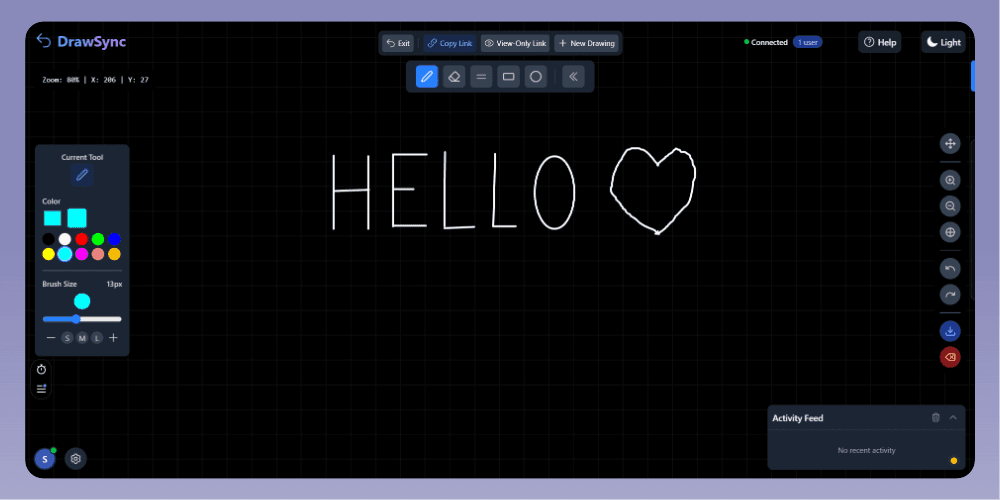
"DrawSync की कल्पना मूल रूप से Coordly नामक एक बड़े मंच के लिए एक एम्बेडेड ड्राइंग और सहयोग सुविधा के रूप में की गई थी।"
"Excalidraw और Eraser जैसे टूल से प्रेरित होकर, लक्ष्य एक हल्का व्हाइटबोर्डिंग अनुभव बनाना था। हालाँकि, जैसे-जैसे कैनवास और रीयल-टाइम सहयोग यांत्रिकी परिपक्व हुई, यह स्पष्ट हो गया कि इंजन अपने आप खड़े होने के लिए पर्याप्त मजबूत था।"
"एक प्रदर्शनकारी अनंत कैनवास के निर्माण के लिए समन्वय मानचित्रण, पॉइंटर-केंद्रित ज़ूमिंग और सुचारू स्ट्रोक प्रक्षेप (interpolation) के आसपास जटिल गणित को हल करने की आवश्यकता होती है - यह सब कई समवर्ती उपयोगकर्ताओं में सुसंगत स्थिति बनाए रखते हुए।"
कैनवास और समन्वय इंजन
The drawing engine is built on the HTML5 Canvas 2D API, utilizing a retained-mode rendering loop. Instead of drawing directly to the screen and forgetting the shapes, every stroke and text object is stored in memory as JSON and re-rendered entirely on every frame update (`requestAnimationFrame`).
This retained-mode approach simplifies infinite panning, zooming, and undo/redo mechanics, as the entire state can be re-projected at any time.
To support an infinite coordinate model, the engine tracks `offsetX`, `offsetY`, and `zoom` factors. Every screen coordinate (where the mouse clicks) must be mathematically transformed into a virtual canvas coordinate before being stored.
- Device pixel ratio scaling for crisp high-DPI (Retina) rendering.
- Custom pointer, mouse, and touch event handling.
- Object-based vector history.
सुचारू वेक्टर इंक
A common pitfall in canvas drawing is using standard `lineTo()` connections between rapid mouse events, which results in jagged, unnatural lines.
DrawSync solves this by calculating the midpoints between successive pointer coordinates and drawing bezier curves (`quadraticCurveTo`) through them. This mathematical interpolation turns discrete pointer events into fluid, natural-looking ink strokes.
रीयल-टाइम सहयोग
To handle the complex requirements of real-time state synchronization, DrawSync utilizes Liveblocks.
Initially, I experimented with a custom Socket.IO implementation. However, managing WebSocket connections, reconnections, and presence scaling for a side project added unnecessary backend overhead.
Migrating to Liveblocks provided managed WebSockets and out-of-the-box presence. Ephemeral data, like remote cursors, syncs via Liveblocks presence (`updateMyPresence`), while persistent drawing events (strokes, clears, undo/redo) are broadcasted to the room via pub/sub payloads.
इंजीनियरिंग चुनौतियाँ
1. अनंत ज़ूम गणित
Problem: Implementing zoom that tracks the user's cursor (pointer-centered zooming) rather than zooming strictly into the top-left corner of the canvas.
Approach: Adjusting the `offsetX` and `offsetY` relative to the current mouse coordinates before applying the new `zoom` scale in the `handleWheel` event.
Result: A natural, predictable navigation experience familiar to users of modern design tools.
2. इरेज़र टकराव का पता लगाना
Problem: Because the canvas is rendered as pixels but stored as vectors, erasing requires mathematical hit-detection.
Approach: Calculating whether a mouse click intersects with the bounding box or path of an existing stroke.
Result: Allows users to erase entire vector strokes by clicking them, rather than pixel-by-pixel bitmap erasing.
समझौते और सीमाएँ
- रेंडरिंग इंजन O(N) रीड्रा रणनीति का उपयोग करता है। हर माउस मूव पर पूरे इतिहास को फिर से रेंडर करने से अंततः अत्यधिक घने रेखाचित्रों पर फ्रेम दर गिर जाएगी।
- एक स्ट्रोक को मिटाने से रेखा के किसी विशिष्ट खंड को काटने या मिटाने के बजाय पूरा वेक्टर पथ हट जाता है।
- Liveblocks परिवेश के बाहर दीर्घकालिक दृढ़ता के लिए वर्तमान में कोई बाहरी डेटाबेस जुड़ा नहीं है।
- कोई अंतर्निहित प्रमाणीकरण प्रणाली नहीं; उपयोगकर्ता यादृच्छिक आईडी के साथ गुमनाम रूप से जुड़ते हैं।
मैंने क्या सीखा
DrawSync का निर्माण स्थानिक तर्क और कैनवास गणित में गहरा गोता लगाना था। अनंत निर्देशांक, स्केलिंग और हिट-डिटेक्शन के प्रबंधन के लिए मानक DOM हेरफेर की तुलना में मौलिक रूप से भिन्न मानसिकता की आवश्यकता होती है।
मैंने यह भी सीखा कि रीयल-टाइम सहयोग डेटा तेज़ी से भेजने के बारे में कम है, और साझा स्थिति को सावधानीपूर्वक प्रबंधित करने, संघर्षों को संभालने और अस्थिर नेटवर्क स्थितियों में UI स्थिरता सुनिश्चित करने के बारे में अधिक है।
मैं अलग तरीके से क्या बनाता
"यदि मैं आज DrawSync को फिर से बनाता, तो मैं इसे पहले दिन से ही एक स्टैंडअलोन उत्पाद के रूप में आर्किटेक्ट करता। मैं बड़े रेखाचित्रों के लिए O(N) रेंडरिंग अड़चन को अनुकूलित करने, मजबूत प्रमाणीकरण लागू करने और आरेख उत्पन्न करने या व्हाइटबोर्ड सत्रों को संक्षेप में प्रस्तुत करने के लिए AI सहायता तलाशने पर ध्यान केंद्रित करता।"
टेक्नोलॉजी स्टैक
| Technology | Role |
|---|---|
| Next.js 15 (App Router) | React फ्रेमवर्क और राउटिंग |
| React 19 | UI स्टेट और कंपोनेंट आर्किटेक्चर |
| HTML5 Canvas 2D | उच्च-प्रदर्शन रेंडरिंग इंजन |
| Liveblocks | WebSockets, उपस्थिति, और रीयल-टाइम घटनाएँ |
| Tailwind CSS | उत्तरदायी स्टाइलिंग और डार्क मोड |
| Vercel | एज डिप्लॉयमेंट और होस्टिंग |